


The Supermarket
The purchase of goods
Computers are vital to the operation of a supermarket store If you have ever experienced the situation of being in a supermarket when the computer system has crashed, you will know about the chaos this causes. The checkout tills come to a standstill and, if the crash lasts for any length of time, you have to leave your trolley and walk out of the shop empty-handed!
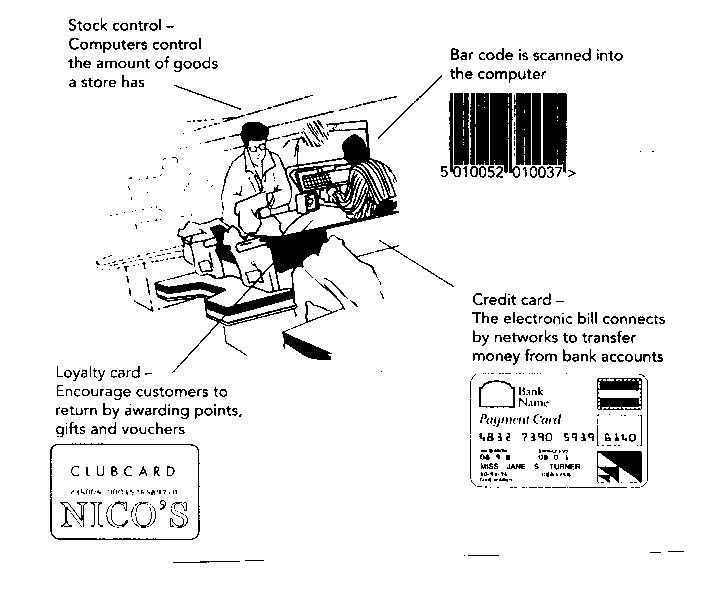
One reason why the checkout tills cannot process the goods in the trolley is that none of the products are marked with the price. The bar code needs to be read in order to obtain the price of the goods from the computer. Computers also control stock levels and process customer payments at the tills.
The checkout till
Supermarket checkout tills are quite sophisticated with laser scanners to read the bar codes. They are also connected to the store’s computer and so the till is given a special name in ICT:
- An ordinary checkout till is called a point of sale (P0S) terminal.
- A checkout connected to a computer with a bar code scanner is called an electronic paint of sale (EPOS) terminal.
- A checkout connected to a computer, with a barcode scanner, and which can transfer money from a customer’s account using the customer's credit and debit cards is called an electronic funds transfer point of sale (EFTPOS) terminal.
As all modem supermarket checkouts will accept customer payments by plastic cards they are all technically called EFTPOS terminals.
Scanning and bar codes
All goods found on the shelves in supermarkets are labelled with barcodes. The barcodes are formed from a series of black and white lines of varying thickness and represent a 13-digit number, which is also printed under the lines. The number uniquely identifies the type of product and the 13-digits are divided into four groups of numbers showing the country of manufacture, the maker, the product number and a check digit. In this case the bar code will be read as follows
| country of origin | UK |
| Manufacturer | Golden Wonder Ltd. |
| Product | Nik Naks - Nice and Spicy |
| Check Digit | it confirms the number has been read correctly |
Making sense of the bar code
A detailed description of how barcodes work is on the  page
page
The bar code can be read with a hand-held scanner or the laser scanner at the checkout. The scanner emits a beam of light that reflects off the bar code. The white lines reflect the light strongly while the black lines reflect less strongly. These variations in reflection are picked up by sensors in the scanner and converted into a digital signal.
Bar codes are cheque to produce (just part of the printing on the packaging) and can be read upside down and on curved surfaces.
If the bar code is damaged, the computer might read the number incorrectly and a tin of beans may be recorded as a bag of potatoes!
The final number of the bar code is a check digit which is calculated mathematically from the other 12 numbers. When the 13 numbers are read, the check digit is recalculated by the computer and if it is different to the character read by the scanner, the reader will not give the beep to indicate a successful scan. In this situation, the cashier at the till can enter the number manually.
What happens to the Bar Code once it's scanned
The supermarket's computer holds a database containing information on all the products sold in the store. As the item is scanned, the bar code number is passed to the computer where a search is made of the database. As soon as the number is matched with the data held in the computer, the price and description are passed back to the till where the customer’s itemised receipt is printed.
| The bar code number is passed to the database from the till. | Scanned number Product database 5010052010037 |
| The description and price of the item are then passed back to the till | Product is: Nik Naks Price: £0.25 |
Keeping a careful check on the amount of stock in a supermarket is very important. If too many items are held in stock then valuable space is being taken up and there is also more chance of food going past its sell-by date. This is particularly important with so much fresh food now available in stores. Having too little stock can also cause problems for the store. If customers find that the goods they want are not available, they may shop in other supermarkets.
It used to be the store manager's job to decide the amount of stock to hold in the store. In making these decisions, the manager will know how often new deliveries can be made and will have estimates of the number of customers likely to visit the store each day based on data from previous weeks. The manager's most important tool for controlling stock, however, is the store's computer. Often these days the stock levels are set using the Management infromation system based on complex mathematical and satistical analysis - which is frequently beyond the store managers grasp.
As each item is scanned at the checkout, the bar code number is passed back to the database in the computer. One of the fields In the database record contains the number currently in stock. This number is decreased by one each time an item is scanned, thus giving the manager an accurate and up-to-date record of the current stock levels at any time.
There are several other fields in the record that are held to maintain the correct stock levels. With the addition of these three fields, the whole process of stock control can be automated. These are:
- Minimum order quantity . This field holds a number that the manager has set as the lowest number the store should hold of an item. In this case the number of Nice ‘N’ Spicy Nik Naks packets should not be less than 288.
- Reorder quantity When the quantity of Nik Naks packets falls below the minimum order quantity, this will be the number that are reordered.
- Supplier code When the goods are to be reordered, the computer will use this code to locate the supplier’s details and automatically generate an order for more packets of Nik Naks. This order will be transmitted electronically over the network direct to the supplier.
For Nik Nacs these items are:
- Number in Stock 316
- Mimmum order quantity 288
- Re-order quantity 144
- Supplier's code: 5010052010037
© LEV
