


2. Milestone Charts
Milestones mark significant events in the life of a project, usually critical activities which must be achieved on time to avoid delay in the project.
Milestones should be truely significant and be reasonable in terms of deadlines (avoid using intermediate stages).
Examples include:
- installation of equipment;
- completion of phases;
- file conversion;
- cutover to the new system.
2.1 Gantt Charts
A Gantt chart is a horizontal bar or line chart which will commonly include the following features:
- activities identified on the left hand side;
- time scale is drawn on the top (or bottom) of the chart;
- a horizontal open oblong or a line is drawn against each activity indicating estimated duration;
- dependencies between activities are shown;
- at a review point the oblongs are shaded to represent the actual time spent (an alternative is to represent actual and estimated by 2 separate lines);
- a vertical cursor (such as a transparent ruler) placed at the review point makes it possible to establish activities which are behind or ahead of schedule.
Project management tools incorporating Gantt Charts include PRINCE [CCTA, 1990], MacProject and Microsoft Project.
Example of a Gantt Chart:
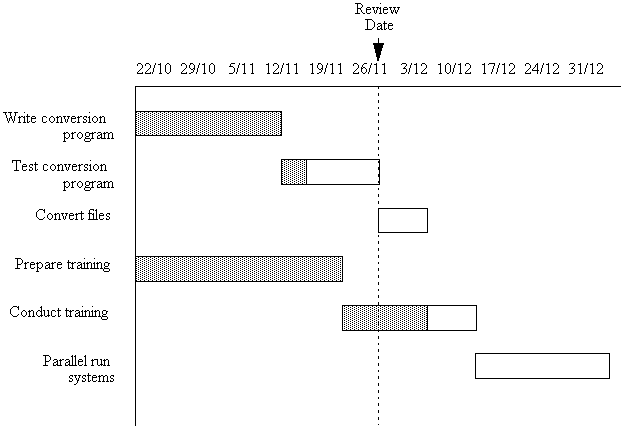
Figure 1: Example of a Gantt Chart
Which tasks is ahead of schedule ? Which task is behind schedule ?
Alternative Gantt Chart incorporating features commonly present in automated tools:
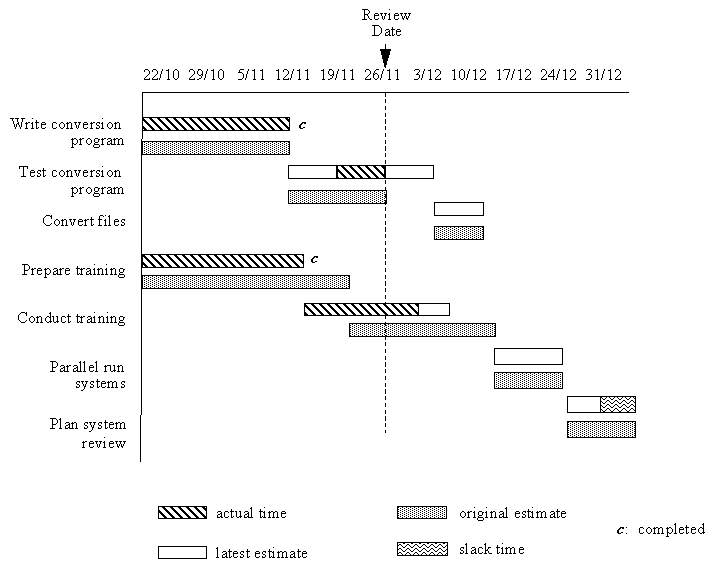
Figure 2: Example of a Gantt Chart showing Project Management Tool Features
Gantt charts produced in this form are:
- graphical;
- easy to read;
- easy to update.
There are no widely accepted standards for Gantt charts. Automated tools are available which produce Gantt charts directly from activity networks or from a full definition of the tasks.
Automated tools have features which assist the planning function including:
- display of original and latest time for task;
- display of person(s) allocated to tasks;
- integration with other planning techniques (i.e. networks and milestones).
©LEV