


Introduction to Data Flow Modelling
Introduction
When analysing systems we usually make use of diagrams. The diagramming technique we are going to look at in this section is Data Flow Modelling. This is a Graphical Notation method which you will need to use in your A2 project.
Data Flow Modelling represents the flow of information around a system, the way it is changed and stored Two terms are used: the 'sources' and 'sinks' of information these are outside the system.
Data Flow Diagrams (DFDs) take a 'top-down' approach, expanding the system description into more and more detail via a series of 'levels', so a set of DFDs will comprise a Context Diagram, a Level 1 DFD, and perhaps some Level 2 DFDs, (one for each complicated Process at Level 1). Level 2 DFDs may not be essential in the project. But a context diagram and a level one diagram will be essential.
DFDs show how information flows around a system, they:
- represent a situation from the viewpoint of the data;
- are a technique to assist analysis of processes in the system.
Objectives:
- to graphically document boundaries of a system;
- to provide hierarchical breakdown of the system;
- to show movement of information between a system and its environment;
- to document information flows within the system;
- to aid communication between users and developers.
1. How to Draw a DFD
1.1 Context Diagram
A Context Diagram simply shows the system as a box, things external to the system as circles and the information flows into and out of the system. I like to think of the Context Diagram as a Level 0 DFD showing only a single process. The context diagram is not an important part of the system documentation. It can however be a presentational aid, we can discuss the interfaces to and from the system without our audience getting concerned with the processes within the system. Below is the start of the context diagram for Electrical World:
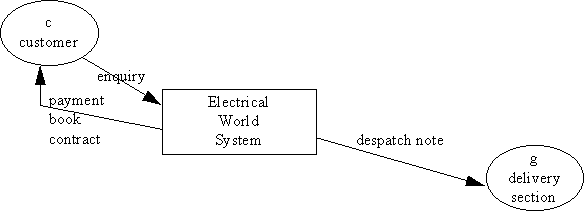
Figure 1: Start of Context Diagram for Electrical World
The Context diagram above shows:
-
'Customer' as a 'source' and 'sink'of data;
-
'Delivery Section' as a 'sink'of data;
-
the 'enquiry' data flow inputting data into the system;
-
the 'payment book contract' and 'despatch note' data flows outputting data from the system;
-
the system itself represented as a single box or 'process'.
© LEV
