


Databases
There are some who would claim that the database management system is the the most important piece of software bar none. Their argument goes that every adult in Britain has their detail on at least half a dozen databases. But you wont find their names in that many word processors or spreadsheets. DBMS are certainly very powerful pieces of software. The largest databases contain millions of records. Given this it is important that we understand how they work and what they can do.
First some terminology. A database is a file containing data equivalent to a text file for a word processor. A Database Management System (DBMS) is the program that is used to create the Database this is equivalent to the word processing package.
Database Structure
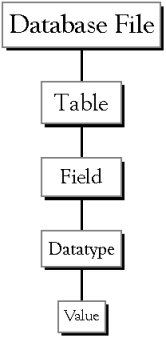 |
Database File: This is your main file that encompasses
the entire database and that is saved to your hard-drive or
floppy disk. Example) StudentDatabase.mdb |
| Table:A table is a collection of data about a specific
topic. There can be multiple tables in a database. Example 1) Students Example 2) Teachers |
|
| Field:Fields are the different categories within a Table.
Tables usually contain multiple fields. Example 1) Student LastName Example 2) Student FirstName |
|
| Datatypes:Datatypes are the properties of each field. A
field only has 1 datatype. FieldName) Student LastName Datatype) Text |
|
| Value: This is the content of the field thus the surname might be "Smith" or "Jones". |
© LEV
