


Raster Graphics
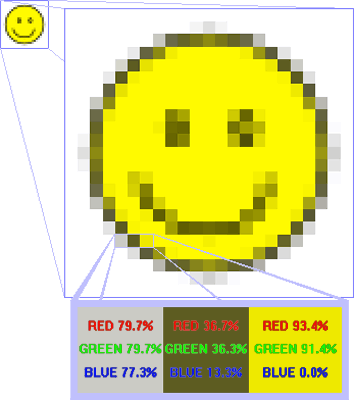
A Raster image or bitmap, is a data file or structure representing a generally rectangular grid of pixels, or points of colour, on a computer monitor, paper, or other display device. It should be the most familiar to Internet users. A Raster format breaks the image into a series of coloured dots called pixels. The number of ones and zeros (bits) used to create each pixel denotes the depth of color you can put into your images. If your pixel is denoted with only one bit-per-pixel then that pixel must be black or white. Go to 4 bits-per-pixel and you're able to set that colored dot to one of 16 colours. If you go even higher to 8 bits-per-pixel, you can save that colored dot at up to 256 different colors.
Raster image formats can also save at 16, 24, and 32 bits-per-pixel. At the two highest levels, the pixels themselves can carry up to 16,777,216 different colors. The image looks great! Bitmaps saved at 24 bits-per-pixel are great quality images, but of course they also run about a megabyte per picture. The following types of files are raster files clp dcx dib fpx img jif mac msp pct pcx ppm psp raw rle tif and wpg .
A bitmap corresponds bit for bit with an image displayed on a screen. A bitmap is characterized by the width and height of the image in pixels and the number of bits per pixel, which determines the number of colors it can represent.
The quality of a raster image is determined by the total number of pixels (resolution), and the amount of information in each pixel (often called colour depth ). For example, an image that stores 24 bits of color information per pixel (the standard for all displays since around 1995) can represent smoother degrees of shading than one that only stores 16 bits per pixel, but not as smooth as one that stores 24 bits Likewise, an image sampled at 640 x 480 pixels (therefore containing 307,200 pixels) will look rough and blocky compared to one sampled at 1280 x 1024 (1,310,720 pixels). Because it takes a large amount of data to store a high-quality image, data compression techniques are often used to reduce this size for images stored on disk. Some techniques sacrifice information, and therefore image quality, in order to achieve a smaller file size.Those that lose information are referred to as "lossy" compression.
Raster graphics cannot be scaled to a higher resolution without loss of apparent quality. The images become "blocky" Computer monitors (in 2004) typically display about 72 to 130 pixels per inch (PPI), and some modern consumer printers can resolve 2400 dots per inch (DPI) or more; determining the most appropriate image resolution for a given printer resolution can be difficult, since printed output may have a greater level of detail than can be discerned on a monitor.
© LEV
