


JPEG file format
Another graphics file format commonly used on the Web is the Joint Photographic Experts Group (JPEG) compression scheme to minimize graphics file sizes. JPEG images are full-colour images (24 bit, or "true colour"), unlike GIFs that are limited to a maximum of 256 colours in an image. Thus there is a lot of interest in JPEG images among photographers, artists, graphic designers, medical imaging specialists, art historians, and other groups for whom image quality is paramount, and where colour fidelity cannot be compromised.
JPEG uses a very sophisticated mathematical technique called a discrete
cosine transformation to produce a sliding scale of graphics compression. Thus
you can choose the degree of compression you wish to apply to an image in JPEG
format, but in doing so you also are also choosing the image quality. The more
you squeeze a picture with JPEG compression, the more you degrade its image
quality. JPEG can achieve incredible compression ratios, squeezing graphics
down to as little as a hundreth of the original file. This is possible because
the JPEG algorithm discards "unnecessary" data as it compresses the image, and
is thus called a "lossy" image technique. The results are easier to see than to
explain. Notice the increasing degradation of the image as we increase the JPEG
compression: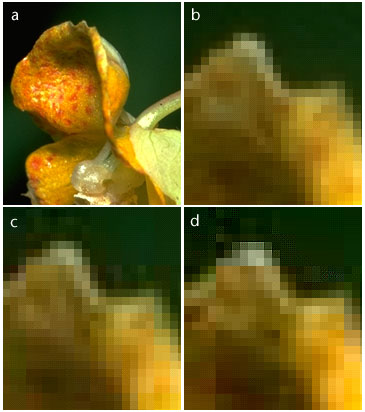
The figure on the left shows an original photograph (a), and three detail views at different levels of JPEG compression: "excellent" quality (b), "good" quality (c), and "poor" quality (d). Notice the boxy quality of the image in (d). The checkered pattern and the dark "noise" pixels in the green background are classic JPEG compression artifacts.
I am afraid there is no substitute for experience when comparing the different compression rates. Books often show example pictures and run on about the quality. The important thing to know is that you can compress a JPEG file and that the quality may be compromised.
Until your in the situation where the need to compress a file is real you won't know weather the compromise is worth while! Compression causes noise and distortion. Situations where you need to compress are - to save hard disk space, in order to make pictures small enough to attach to e-mails, and to make web pages load quickly. The first two may be unavoidable but you may have the option are the savings in download time worth the cost of ruining your images?
Save your original uncompressed images!
You will probably use paint shop pro for image file handling. Once you compress an image with JPEG, you have lost data and can never recover it again, so always save an uncompressed original file of your graphics. Work systematically save each stage of your work as image1, image2 etc.
A new form of JPEG file called "progressive JPEG" gives JPEG graphics the same gradually-built display seen in interlaced GIFs, Netscape offers full support but Internet explorer doesn't. Like interlaced GIFs, progressive JPEG images usually take longer to load into onto the page than standard JPEGs, but do offer a quicker "preview" to the reader. Paint shop pro version 4 onwards Netscape 4 onwards support this feature. Possibly MSIE 5.5 does. Microsoft aren't too clear it's probably a partial implementation
JPEG Image Artifacts
The JPEG algorithm was optimised for compressing conventional pictorial photographs, and is also very good at handling complex realistic illustrations (which look like photographs). Photos and art with smooth colour and tonal transitions, and few areas of harsh contrast or sharp edges are ideal for JPEG compression. However, most page design elements, diagrams, the typography within images, and many illustrations are composed of hard-edged graphics and bright colours that are seldom encountered in photographs (part a; b is a magnification of the diagram). JPEG compression can be quite poor at handling many computer-generated graphics, buttons, type in images, or any other hard-edged "artificial" coloured object seen in artwork or diagrams. When compressed with JPEG, diagrammatic images show a "noise" pattern of compression garbage around the transition areas the JPEG algorithm "wants" to see smooth tonal transitions and cannot properly reproduce the harsh transitions at the edges of diagrammatic graphics.
For more on JPEG check out the FAQ page. There's no obvious place to say this but the equivalent to a GIF animation is called an Mpeg this is often the fire type created by digital cameras.
© LEV
