


GIF file format
The Graphic Interchange Format (GIF) was developed by CompuServe in the 1980s as an efficient means to transmit images across data networks. In the early 1990s the original designers of the World Wide Web adopted the GIF format for its efficiency and widespread familiarity. Today the overwhelming majority of images on the Web are in GIF format. Virtually all Web browsers that support graphics support the GIF file format for on-line images. The GIF format incorporates a compression scheme to keep files sizes at a minimum, and GIF files are limited to 8-bit (256 or fewer colours) colour palettes.
There are now several slight variants of the basic GIF file format that add support for transparent colour, and support for the interlaced GIF graphics popularized by the Netscape Navigator Web browser. You may see references to the different GIF formats, such as "GIF87a," or "GIF89a." All forms of GIF images will work in Web browsers that support the basic GIF file format, so that you do not have to worry whether your readers will be able to see your GIF graphics, regardless of the GIF version that you use. Users whose browsers support the transparency and interlacing (such as Netscape Navigator and Microsoft Explorer) will see more sophisticated visual effects, but everyone will see your basic GIF images.
GIF File Compression
The GIF file format uses a relatively basic form of file compression (Lempel Zev Welch, or LZW) that squeezes out inefficiencies in the data storage without causing a loss of any data ("loss-less compression") or distortion of the image. The LZW compression scheme is most efficient at compressing images with large fields of homogeneous colour. It is not very good at squeezing complex pictures with lots of grainy texture. All variations of the GIF graphics file format incorporate LZW file compression.
In 1994 there was concern over the licensing of GIF images. The LZW form of compression that was developed years earlier by Unisys. As GIF images suddenly began appearing on countless pages, the Unisys Corporation decided to enforce its license. There were two effects many small companies producing picture editors were sued and folded. The open systems movement developed PNG and vowed to "ban" gifs
The conventional (non-interlaced) GIF graphic downloads one line of
pixels at a time, and Web viewers like Netscape display each line of the image
as it gradually builds on the screen. In interlaced GIF files the image data is
stored in a format that allows Netscape (and other viewers that support
interlaced GIFs) to begin to build a low-resolution version of the full-sized
GIF picture on the screen while the file is still downloading. The
"fuzzy-to-sharp" animated effect of interlacing is visually appealing, but the
most important benefit of interlacing is that it gives the reader a quick
preview of the full area of the picture.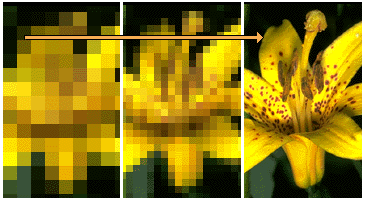
This preview effect can be misleading interlaced graphics are not faster-loading than non-interlaced graphics, they just look as if they download faster because the rough preview comes up faster. Note that the interlacing effect usually only works the first time you try them. After that your browser will probably cache the images locally (on the c: drive in temporary internet files) and subsequent loading will occur (very quickly) from your hard disk, not from the Web.
The GIF89a file format allows you to pick one colour from the colour lookup table of the GIF to be transparent. Using current image editing software like Adobe Photoshop (and many shareware utility programs) you can select one colour to become invisible. Normally the colour you select is a background colour. Unfortunately, the transparent property is not selective; if you make a colour transparent, then every pixel in the graphic that shares that same colour will become invisible. This can sometimes have unexpected consequences when a colour is used both in the background and in other places in the graphic.
Antialiasing visually "smooths" the shapes in graphics by inserting pixels of intermediate colours along boundary edges. Adding transparency to a GIF graphic can also lead to disappointing results when the graphic contains antialiased edges with pixels of multiple colours. In some cases going transparent can cause an ugly white halo around the graphic
© LEV
