


The Traditional Mouse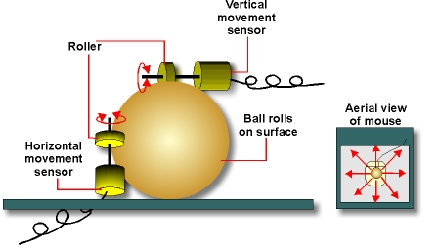
A mouse is almost exclusively used in conjunction with a keyboard as part of a WIMP Graphic User Interface. The mouse is moved and the speed and direction of movement are echoed in the movement of a pointer on the VDU screen. This is achieved by using a rubber coated ball which cause two movement sensors to be activated. More modern mice use reflected light to detect movement. This overcomes the problems of dirt and fluff blocking up the mechanism.
Buttons on the mouse can be used to pull menus that the pointer is on down or to select menu options.
A mouse can be used to input data for drawing or graphic design programs. Again a pointer or similar icon is moved around the screen as the mouse is moved by the user.
The mouse is useful for inputting both relative movement and speed of movement. It does not however provide data about absolute positions. In other words the computer can detect how far left or right the mouse has been moved but it will not know whereabouts the mouse is on the desk.
One problem with using a mouse is that it needs a flat surface to move over. This has led to the use of a small roller ball on laptop computers where there may be no suitable surface available for a mouse.
Mice are very susceptible to dust and dirt which makes them produce erratic data, causing the pointer on the screen to jump rather than move smoothly. This can be prevented by regular cleaning and the use of a mouse mat.
Graphics Tablet and Light Pen
A graphics tablet is a specialist input device for technical drawings. It consists of a flat tablet and a stylus. The absolute position of the stylus on the tablet's surface can be detected. This provides an input device that is similar to the paper and pencil that the user may already be familiar with.
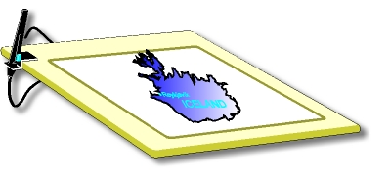
A similar effect is achieved with a light pen except in this case the flat surface is the VDU screen itself. The pen is triggered by the raster scan of the VDU - it detects when the electron beam building up the screen image has just passed the point where the pen is positioned. Knowing the instant at which the beam passed the pen, the software can calculate whereabouts on the screen it has been placed.
Alternatives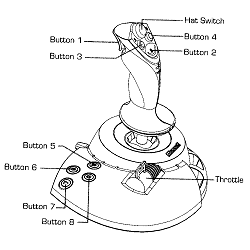
| Joy Sticks | The joystick is the favoured option for games players. See the image to the right: |
| Touch Sensitive pads | These are supplied with laptops and are intended to replace the mouse. Some users dislike them. |
| Tracker Balls | space saving device found in some laptops where the ball itself is moved. |
| pimples | protrusions which detect the side on which you press to illicit movement a much less common |
| Graphics pads | This is a touch sensitive membrane that is operated by a stylus. The stylus works rather like a pen. These can be very useful for drawing office type applications, and art work of all types. |
| Presentation tools | There are a range of radio controlled devices that can be used when talking to a large audience. these usually have "move on" and "move back" buttons and may also have a light pen to allow remote pointing. the light does not interact with the screen though. |
There is increasing interest in the use of cordless mice and keyboards which link to the computer with infra-red radiation thus allowing the user to position the hardware with greater freedom.
© LEV
