


Digital scanners
A scanner is a device that analyzes a physical image (such as a photograph, printed text, or handwriting) or an object (such as an ornament) and converts it to a digital image.
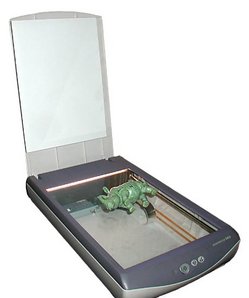
Most scanners today are variations on the desktop (or flatbed) scanner. A desktop scanner is usually composed of a glass pane, under which there is a bright light (often xenon or cold cathode fluorescent) which illuminates the pane, and a moving charge-coupled device. Colour scanners typically contain three rows of charge-coupled device elements with red, green, and blue filters. Images to be scanned are placed face down on the glass, the light turns on, and the charge-coupled device and light source move across the pane reading the entire area. An image is therefore visible to the charge-coupled device only because of the light it reflects. Transparent images do not work in this way, and require special accessories that illuminate them from the upper side.
Scanner quality
The colour depth and the resolution detirmine a scanners quality. Colour depth varies depending on the charge-coupled device characteristics, but is usually at least 24 bits. The resolution is measured in dots per inch (dpi), Instead of using the scanner's true optical resolution, the only meaningful parameter, manufacturers like to refer to the interpolated resolution, which is much higher thanks to softwareinterpolation. As of 2004 a good flatbed scanner has an optical resolution of 1600–3200 dpi, high-end flatbed scanners can scan up to 5400 dpi.
Output data
The final result is a non-compressed RGB image which is typically transferred to a host computer's memory. Such an image can be processed with a raster graphics program (such as PSP) and saved on a storage device.
Computer connection
The amount of data generated by a scanner can be very large: a 600 DPI 9"x11" (slightly larger A4 paper) uncompressed 24-bit image consumes about 100 mB of uncompressed data in transfer and storage on the host computer. Recent scanners can generate this volume of data in a matter of seconds. Therefore, a fast connection is optimal.
Early scanners had parallel connections that could not go faster than 70 kb/s. Professional models adopted the SCSI - II connection, which was much faster (a few megabytes per second) albeit expensive, and frequently requiring a dedicated EXPANSION CARD to be put inside the host computer. fIREWIRE is replacing SCSI as the standard in production (high volume) document scanners. Recent economic models come equipped with usb connections. Recent models use USB 2.0 connections that can transfer up to 60 megabytes per second.
Optical Mark Reading
The input document is accurately laid out. Input consists of the presence or absence of a mark in pre-determined positions on the source document. Normally the mark is a (soft) pencil or black biro line joining two dots on the document. The document is normally printed in an ink that will not be seen by the reader. Lines down the edge of the document allow the reader to determine the orientation and position of the document as it passes through.
The OMR sheets must be printed to a high specification. They cannot normally be photocopied for use because a photocopier does not reproduce the positions of the guide marks accurately. This increases the cost of the source documents.
OMR provides an easy way for users to record data where there are a limited number of possible inputs. Several thousand documents per hour can be read. OMR can be used to collect numerical data and it is also used to capture answers to multiple choice examinations. A further possible use would be collecting survey information. It has been used for collecting meter readings but is now superseded by hand held data recorders that store the meter readings in RAM.
OMR is useful for turnaround documents. That is documents that originate from the computer, are completed and then use to input further data. In the case of multiple choice answer sheets the candidate number and the centre number would be printed in OMR form on the answer sheet before being sent to the school.
Disadvantages of OMR are that creased or dirty documents cannot be read. If the user alters an entry the resultant smudging may make the document unreadable. It can only collect a limited range of responses that can be indicated in advance on the form.
An OMR would have a hopper for rejected documents that could not be read or which had entries that were not permitted - e.g. two answers to a question. These would be examined by the operator and the data then input manually.
Optical Character Recognition
Printed or even hand-written characters on the document are compared with stored character shapes. Up to 300 pages per hour can be scanned although there may be problems over distinguishing between O and 0, I and 1 unless special fonts are used.
OCR is useful for inputting large volumes of text - perhaps for later checking and editing. An example might be to input a long list of addresses that are available in printed form only.
OCR is heavily used in turnaround documents in application such as utility billing and insurance premium renewal. The bill is prepared with OCR customer identification and posted. When the customer pays the bill they return part of the original document with their payment and this is fed back into the system via an OCR reader.
As with OMR, provision must be made for collecting and inputting data from rejected documents by hand.
© LEV
