


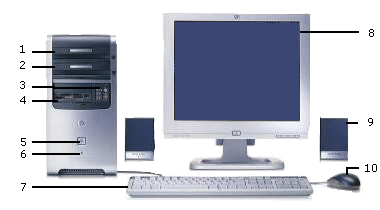
Desktop PC
1. This machine has a CDR drive this is used to load software programs and can be used to write data to a burnable CD A CD will hold about 650mB of data (equivalent to 450 floppy disks)
2. The separate DVD drive shown in this machine is unusual as DVD drives will normally burn CDs as well This machine has been set up to copy CDs. Ideally a spare 5¼ inch bay is desirable.
3. USB ports. There are 4 on the front of this machine they will take memory sticks, card reader, scanner, camera etc. Whilst it is convenient to have some USB ports on the front of the case some at the back plane as well allow more permanent devices like the printer or scanner to be left plugged in without wires trailing everywhere.
4. The 3½ FDD (floppy disk drive) only takes 1.44MB of data, for this reason it is becoming obsolete as computers become more data "hungry". Memory sticks are typically 128mB ranging from 8mB to 1GB)
5. The on /off switch. 6. The power on LED (light emitting diode)
7. The keyboard is the main point of contact with the PC they are inexpensive so its a good Idea not to get too basic when you buy one.
8 The monitor. You have a choice of a traditional CRT (cathode ray tube) monitor or a flat screen monitor. There is more detail in a later section on these. Make sure the refresh rate is at least 85Hz to avoid filcher. Monitors are measured from corner to corner. You shouldn't buy one that's less than 15inches wide.
9. Often a forgotten component. If you plan to listen to music or watch video on the PC its best to buy decent speakers.
10 The mouse. Roller ball mice are cheep est but they need to be cleaned A light based mouse is only a little more expensive and saves the hastle.
© LEV
