


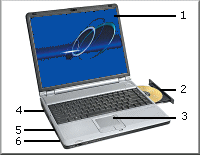
 The Laptop
1. The screen of your laptop will be a LCD (liquid crystal display) they can be black and white but colour is "normal" black and white is worth considering if your work is not too demanding as they batteries last longer.
The combined DVD/CDR drive is found in nearly all laptops. It is usually the only permanent means of data input and output. Few laptops have a floppy disk drive these days. (this saves weight and the storage is too small).
3. Track-pad (there are several other names for this). this is the all-in-one equivalent to a mouse. Make sure you try before you buy as this can be harder to use.
4. The battery is usually access from underneath and to the rear. The size and type of battery is important as it is an important part of the weight of the laptop. Three type are available Avoid NiCd (nickle cadmium) batteries. The cheaper options is NiMH (nickle Metal Hydride) cells Li-ion (Lithium ion) batteries are lighter and longer lasting but cost more. All laptops can run from the mains and once plugged in the batteries will recharge. It is important to allow batteries to discharge completely before recharging them. As this prolongs the battery life. Typically you can expect batteries to last a couple of years.
5. Ports. Because a laptop has a limited number of parts the ports it has are important as they allow other devices to be connected. I would suggest you need at least 4 USB ports, a Rj45, and RS232 ports are essential
6. Consider the size and weight to the laptop. Size effects a number of things other than ease of movement. small means sawmill keyboards and a small screen
© LEV
