


Inside A PC
For those of you with the curiosity to look inside a PC you may be disappointed how little there is in the box. Miniturisation of components means that a standard case is mostly empty. However the heat generated makes the space useful.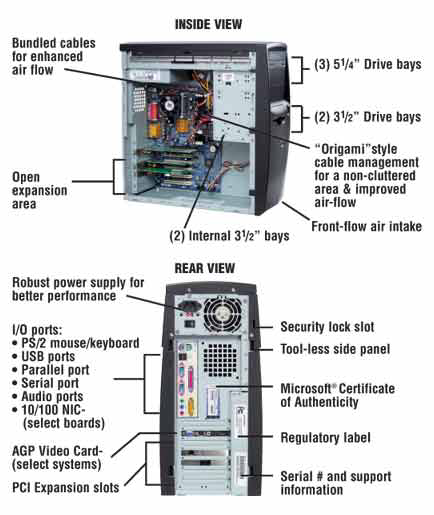
The essental content of a case is shown opposite. The 5¼ bays take the CDR and DVD drives the 3½ inch bays take the floppy disk drive and the hard disk drive(s)
The expansion bays allow you to add cards like a graphics card or a sound card.
The unlabelled power supply unit is on the top left in this case. Note all the cables are tidied away to allow good air flow, in order to cool the CPU.
To the rear of the computer you have the computers back plane which houses many of the i/o (input and output) ports.
It is important that the air exit holes for the fan and power supply are not obstructed. They should always be 2 to 3 inches from a wall. Items should not be placed on the case for the same reason.
Note that the labels on the case are important you should keep a record of the serial number for your insurance comany in case of theft or damage.
© LEV
