


How monitors work.
 |
I guess that the physics department have told you all about the Cathode Ray Tube so none of that here. The following is a brief overview of color computer displays that explains some of the basic terminology used in the Macintosh and Windows operating systems. Because CRT's transmit light, CRT displays use the red-green-blue (RGB) additive color model. The RGB model is called "additive" because a combination of the three pure colors "adds up" to white light. |
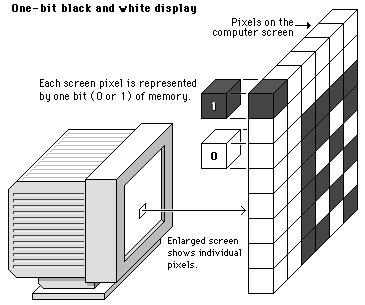 |
The computer's operating system (Mac, Windows, etc.) organizes the display screen into a grid or x,y coordinates, like a checkerboard. Each little box on the screen is called a "pixel" (short for "picture element"). Current Macintosh and Windows displays are made up of these grids of pixels (see screen diagram below). Pixels and colour To control the colour of each pixel on the screen the operating system must dedicate a small amount of memory to each pixel. if the memory dedicated to the display screen is part of the computers RAM then it may be referred to as "video RAM" or "VRAM". Most modern PCs have video memory that is part of the video card usually 32Mb on a basic machine. In the simplest form of black and white computer displays a single bit of memory is assigned to each pixel. Since each memory bit can only be positive or negative (0 or 1), a one-bit display system can only manage two colours (black or white) for each pixel on the screen: |
 |
If we dedicate more bits of memory to each pixel in the display, we can manage more colours. When eight bits of memory are dedicated to each pixel, each pixel could be one of 256 colors. (256 = 2 to the eighth power; in other words, 256 is the maximum number of unique combinations of 0's and 1's you can make with eight bits). This kind of computer display is called an "eight-bit" or "256-color" display. Such displays were common on 486 pcs. |
 |
If still more memory is dedicated to each pixel, we can get nearly photographic color on the computer screen. "True-color" or "24-bit" color displays can show millions of unique colors simultaneously on the computer screen. True-color (24-bit) images are composed by dedicating 24 bits of memory to each pixel; eight each for the red, green, and blue components (8+8+8=24). The amount of VRAM dedicated to each screen pixel in the display is commonly referred to as the "bit depth" of the monitor. Most Mac and Windows microcomputers sold in the last few years are capable of displaying bit depths greater than eight-bit, in thousands (16-bit) or millions (24 bit) of simultaneous colors. To check your computer system for the range of bit depths available to you, use the "Display" control panel (Windows9X) or the "Monitors" control panel (for Macintosh) Do not alter the values. |
© LEV
