


Spreadsheets
Before too much is said about Excel Remember Excel is only one of a range of commercial products there are loads of others. This just happens to be the one we are using at present.
Here are the main parts of the excel interface:
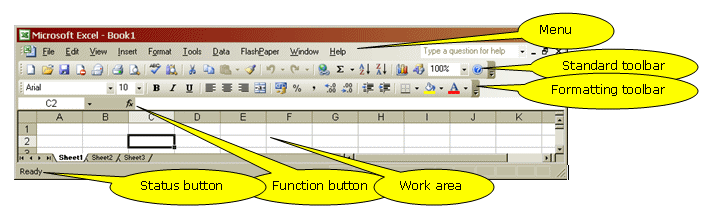
The function button lies in a strange piece of windows design called the formula bar. It is not a toolbar, as it does not appear in the toolbar menu. It always shows three things
- To the left it shows the name box at present this displays C2 the active cell but this can be used to name cells and ranges.
- In the middle the function button
- To the right you have the formula bar proper. If you click on this part you can edit a formula or if your cell as contents these will be displayed here. The cell you click on shows the results of the calculation whereas the formula bar shows the calculation itself.
But other items appear when excel is in certain states. The tick (enter) and the cross (cancel) appear to the left of fx if you are editing a formula.
The Tabs labelled sheet1 and so on are used to move from one worksheet to the next. You can customise these names by double clicking on them.
© LEV
