


Spreadsheets
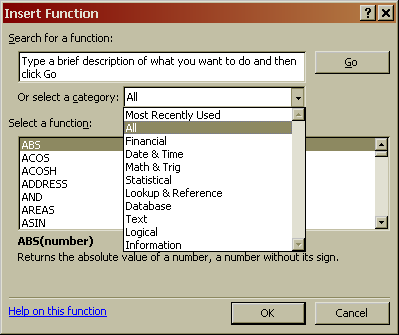
One of the most important abilities of spreadsheets is often the most under-used. Spreadsheets have a whole series of functions. You can see how many by clicking the function button. The function button is shown here. If you do this you will see the function selection window. (right) This lists all of the various functions and provides help in making valid formulas.
The hundreds of functions are listed by the type of data they manipulate. The simplest functions are not included in these lists. They are the infix operators. It might surprise you to know that you already know all about many of these you just aren't familiar with their posh name! infix operators are + - / * ^ and & they do simple maths functions for example the formula =A1^2 will square the value in A1. The & operator will joint to pieces of text together. As shown on the last page.
The operators used in excel are evaluated in a set order Those Higher in the list are done first
| Precedence | Operation | Operator |
| 1 | Exponentiation | ^ |
| 2 | Multiplication | * |
| 2 | Division | / |
| 3 | Addition | + |
| 3 | Subtraction | - |
| 4 | Concatenation (putting 2 strings together, like Jenn & ifer) | & |
| 5 | Equal To | = |
| 5 | Greater Than | > |
| 5 | Less Than | < |
This means that 3*2-1 = 5 not 3 (because the times is done before the minus). It is bad practice to use too many infix operators =A1+A2+A3+A4 should be expressed as =sum(A1:A4)
Spreadsheets provide great power. The power comes from three things.
- The use of iteration (repeat calculations)
- The use of lookup tables
- The logical functions
Iteration makes all sorts of complicated maths possible with fairly simple functions
Lookup tables allow you to do tasks like find the age of a person from a table of their personal details.
The logical functions provide the a lot of power to the spreadsheet package. They allow logical decisions to be made. For example it is possible to add up the numbers of cells in a column with a number in them bigger than 9, or decide if the sum of a range of cells is greater than a thousand. All sorts of decisions can be made using these logical functions
© LEV
