


Spreadsheets
A spreadsheet (or workbook) is made of one or more worksheets. The worksheets contain a number of cells. The cells are organised into rows and columns. It is traditional to call the columns by letters and the rows by numbers each cell thus has a unique name like A1 F6 or AS1998.
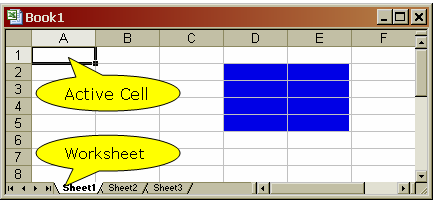
Cells can also be grouped into ranges. A range is named by the top left and bottom right cell separated by a colon this the blue cells in the sheet to the left are the range D2:E5. Data can be placed in any cell in the spreadsheet empty cells are allowed.
If more than one work sheet is in use there will be two (or more) cells called C2 these distinguished by using a fuller name Sheet1!C2 and Sheet2!C2
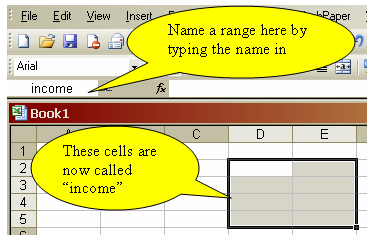
It is sometimes convenient to give a range a name (to help remember it) this is done by typing the name in the space indicated in the diagram to the left. Once a range has been named all the formulas in the spread sheet will be updated to show the name rather than the range. thus =Average(D2:E5) will become =Average(income).
Cells can be addressed relatively or absolutely. This the formula =A1/A3 is a relative address.Whereas =$A$1/$A$3 will give the same numerical value. But they will behaive differently if replicated. (replication is the process of using the small square at the bottom left hand corner of the active cell to drag cell contents over a series of cells.
This is best demonstarted rather than discussed as theory!
© LEV
