


Spreadsheets formulas II
Spreadsheets make use of formulas. The better you are with formulas the more you will get from the package. Students often only know the sum function and try to use it for everything. It is an example of a very commonly used type of function. =SUM(A1:A7) will add up the contents of the cell in the range A1:A7 Similiar functions are =AVERAGE(A1:A7) =MIN(A1:A7) for the minimum in the range. There are lots of similiar functions.
A second type of function takes two values for example =MOD(7,3) this gives the remainder of the division of 7 by 3 (1). Or ROUND(23.56745,1) will give 23.6 as it rounds the number to one decimal place. Other functions take three and four values. It is not possible to describe them all here. But fortuantely that isn't necessary as most spreadsheets provide a help system to let you create formulas more easily. It works as shown below
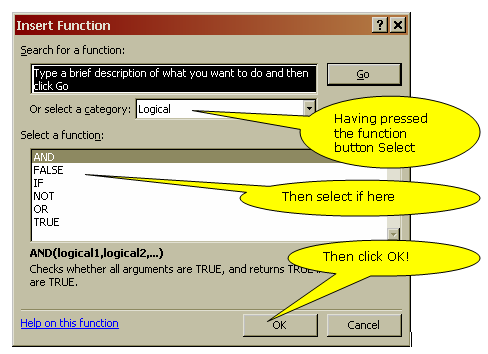
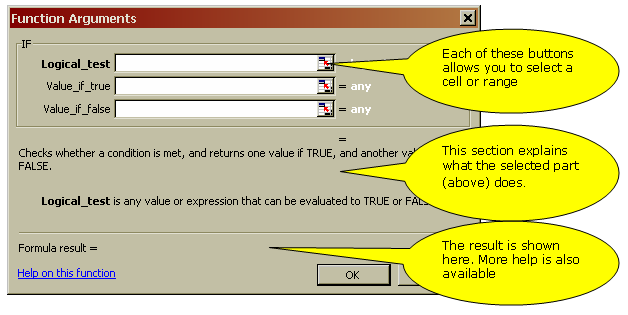 Try it its quite easily done!
© LEV
